Why creating an Excel guide took so long

Last week I finished Excel In 30 Minutes, a basic Excel guide and the third book in my In 30 Minutes™ brand.

The writing and production processes associated with Excel In 30 Minutes took twice as long as those for my previous two books about Dropbox and Google Drive. Why? I see three reasons:

  1. The complexity of spreadsheets. Demonstrating something as simple as addition or calculating a percentage require several discreet steps and screenshots. All of this had to be explained, and the total length of the Spreadsheets book was about 40% longer than the Dropbox book — mostly because of extra screenshots (100 in all!)
  2. Multiple versions of Excel. There is basically only one version of Dropbox and Google Drive floating around. Excel has many commercial versions currently in use. There are significant differences between them, which required additional writing and testing.
  3. I included Google Spreadsheets as well. My reasoning: Most spreadsheets are basically the same, and not everyone owns or wants to own Excel. I thought including explanations of how to do the same tasks in Excel and Google Spreadsheets would be a good idea — but it took extra time to include those explanations.

Sales off to a slow start

In terms of sales, I’ve found the book has gotten off to a slow start. Only two copies have been sold in five days. Poor search ranking in Amazon is part of the reason. But I am also wondering if readers do want to focus on a single product (Excel) rather than a class of software (spreadsheets). Depending on the results of various marketing efforts as well as sales across various channels, I may have to rethink the name of the book or concentrate only on Excel (instead of both Excel and Google Sheets). This will take some experimentation to get right …

One of the 100 screenshots used in the book:
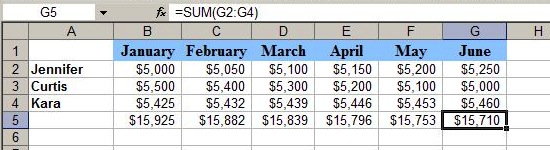
Excel Basics guide

Promoting eBook manuals with videos

Every Friday afternoon for the past month, I have been setting aside 90 minutes to create a few new videos to promote my ebook manuals for Dropbox, Google Drive, and Excel. Here are some recent titles:

Google Analytics Video Tutorial: Three Things You Must Monitor
How To Convert CSV Files In Excel
How to convert Excel files to Google Drive
How to export a PDF using Google Drive’s free spreadsheet program, Google Sheets

When I wrote the books, I saw this type of video — short clips on very specific topics — as supplementary material that added extra value for readers.

However, after a few weeks of posting the videos to YouTube, I noticed an interesting trend: The blurbs in the videos were driving traffic to the book websites. I assume that the visitors are not people who have already bought the book. Rather, they are people who have searched for these topics in Google or YouTube, and via the links in the blurb and the promos in the video, they end up on my sites. I have recorded at least one sale from a visitor tracked from YouTube who ended up purchasing a PDF. I suspect other video visitors who have come to my site and then gone to Amazon or iTunes have also ended up making a purchase, although it is not possible for me to confirm this.

Right now, the videos don’t take long to produce — typically one hour per video, including recording, editing, and posting online. The time investment seems worth it for now, although I worry about my availability in the months to come as consulting and other ebook responsibilities ramp up.

A new online video tutorial for Google Drive and Docs

(Update) These early YouTube experiments led to the creation of a full Google Docs video course that covers Docs and Drive. It’s about 30 minutes long, and is slicker than the above videos, including on-screen narration and callouts for special features. Check it out!

Google video

Ebook pricing experiment: Lessons learned

Earlier in the summer, I published my second ebook. In some respects, it was similar to my first ebook (a guide for Dropbox). The topic was similar (Google Drive), and it was also a guide aimed at beginning users. But there were some differences, too, including:

  • A different brand: “Rogue Manual” instead of “In 30 Minutes”
  • A different price point: 2x the Dropbox manual.

I learned a very valuable lesson from #2, based on lackluster sales and a very negative piece of feedback I received on Amazon. The price was way too much. This was reflected in practically no sales on Amazon or as a PDF download, and one of the buyers writing a comment that said a book like this should be priced less than $10. I pulled the title from Amazon but will keep it up as a PDF.

Google Drive manualIn the meantime, I have prepared a scaled-down version of the Google Drive guide. It’s being branded “In 30 Minutes” and is using the same lower price point as the Dropbox guide. You can learn more about the title and buy it from the website linked in the sidebar of this blog post.

Ebook #2 hits the virtual shelves

Google Drive manualEarlier this week, my second ebook was published in the Kindle Store and as a paid PDF download (see inset cover). The book explains how to use Google Drive, a very powerful online software suite that includes word processing, spreadsheets, a presentation tool, and online storage. It’s kind of like Google Docs for Dummies … but not quite!

If you visit the product page, you’ll see that the price point is higher than my first book, a Dropbox guide. There are a few reasons for this:

  • The new title is about 1/3 longer, and more comprehensive.
  • It reaches to a more business-focused audience, as the Google Drive suite contains two programs that are seldom used by home users: Spreadsheets (which has similar functionality to Microsoft Excel) and Presentations (which is a bare-bones PowerPoint clone with some neat online functionality thrown in). (Update: Google has since renamed these programs Sheets and Slides, respectively.)
  • I want to test the response rate to higher-priced ebooks.
  • I want to see how high-value affiliate offers work. I’m currently allocating 56% of the $17.99 cover price to affiliates enrolled in my hosting company’s affiliate program. This translates to $10 per affiliate, compared to under $3 per affiliate for the Dropbox manual affiliate program. (Update: I killed the affiliate program. Too much room for abuse as the incentives aren’t aligned with what I want to promote … quality!)

Experimental mode for ebooks

As you can see, I am in experimental mode when it comes to design, pricing, length, and other aspects. The prices and affiliate program percentages will likely change as I figure out what works, and what doesn’t.

In the meantime, stay tuned for book #3! I have also started to consider other topics, ranging from Excel to LinkedIn and even other technical topics. I won’t be the only author, though … the best way to achieve scale is to find other talented authors who know these technologies and have existing audiences through blogs or other writing arrangements.

Dropbox in the rear view mirror, ebook #2 on deck

Dropbox old coverMy first ebook, Dropbox In 30 Minutes, answers the question “What is Dropbox” and gives readers lots of practical tips on how to get the most out of Dropbox. In the first month of its release, sales have been slow but steady.

I have also written a draft of my next book, on Google Docs/Google Drive. Last week, my copy editor gave it a first read-through (in Google’s Documents program, naturally!). This week, I am going to refine the draft, prepare images, and start to put together the Word version, which is used to generate the Kindle and Nook versions.

Having been through the writing and production processes for this book I know what to expect with the new book … and it should go more quickly, as I will know what mistakes to avoid. But I have to admit — dealing with ebook production is unpleasant, compared to blogging and other forms of electronic publishing that use content management systems.

My goal is to have the Word manuscript ready by the end of the week, and do all of the conversion and distribution next weekend. We’ll see how it goes …

Dropbox FAQ: Deleting Dropbox files

I’ve started publishing some excerpts from my new Dropbox guide. Many people have begun to suppose the book is like Dropbox for Dummies (it’s not the same!)

Anyway, back to the book. During the course of researching the book, I made an interesting discovery: Deleting Dropbox — I mean really wiping out the account and all of the files everywhere — is a major pain.

Facebook and other services get flak for making account deletion difficult. The usual methods:

  • Hiding the option deep in the settings panel
  • Not completely deleting the account (“in case you change your mind”)
  • Requiring multiple steps (“are you sure?”)

But Facebook has nothing on Dropbox. Not only is there is no single “delete Dropbox” button to press, the ways that most people might think are sufficient (closing the account on the Dropbox website, deleting the Dropbox app on the computer) leave files and folders perfectly intact. I learned this myself when I deleted the app on one of my computers. I didn’t expect it to have any effect on the master Dropbox account, but I at least thought the files on the PC would be trashed along with the app. I was wrong.

Deleting Dropbox files: Multiple steps required

Dropbox android
Deleting Dropbox files can be done on a mobile device

As for the question, “How do I delete Dropbox“, be prepared to spend some time chasing down and wiping all of the files on various PCs and devices before going to the Dropbox website to take an additional step. It may be inconvenient, but if you want to make sure everything is gone, a little pain is required.

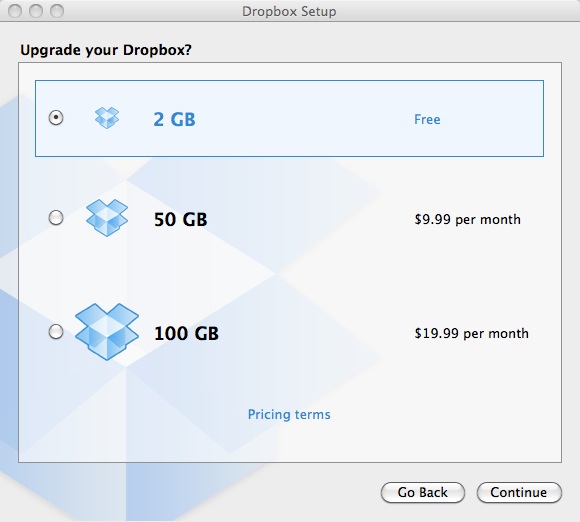
Note also that Dropbox sometimes changes the way stored files are handled or backed up. In addition, the service has paid tiers which offer more control over storage management. These topics go beyond the scope of this post, but you can find out more about paid features on the Dropbox website.


Writing an ebook for Dropbox newbies

A few days ago, I published my first ebook, “Dropbox In 30 Minutes“. The product website answers the question “What is Dropbox“, and includes an overview of the contents of the book, plus links to a few locations where it can be bought. What I briefly wanted to mention in this post were some of the requirements to publish a 10,000-word e-book on a technical topic (Dropbox, an online storage service). Technical production was a DIY effort, which I suspect is rare in this business — most authors are good at writing, but need help with production.

About Dropbox
Dropbox is an online storage service for computer files

I knew almost nothing about ebook publishing before I started, and had never authored a print book. However, I quickly discovered that I had very strong skills in other areas that are required for publishing an ebook. They include:

  • Writing: Besides writing magazine features, newspaper articles, a business case, and a graduate school thesis, I’ve been a blogger for more than 10 years and have published more than 1,000 posts in various locations. I have a strong voice, and cranking out 10,000 words is no longer a big deal.
  • Editing: I have worn many editorial hats over the years, from copy editor all the way up to managing editor for The Industry Standard. This helped with catching errors, organizing the text, and coordinating the various elements required for the ebook (for instance, screenshots, text, and front matter). Note that I did ask two other experienced editors and a technical expert to review early drafts before I published, however.
  • Design/Layout: I’ve worked on print layout as a “paginator” for a technology magazine, and have been working with Web layout through blogs and other online work for more than 15 years. I was able to apply this knowledge to the design of the cover as well as the arrangement of text, headings, and images in the body of the document.
  • HTML: I didn’t know this until I looked at the publishing guide for the Kindle, but HTML is actually an important part of some ebook publishing standards. I first learned to code HTML in 1995, so it was not a problem for me to fix some HTML code that Microsoft Word had generated for my Kindle edition.

An ebook for Dropbox users becomes a template for other books?

I could keep on going with this list. Experience with business setup, marketing, even photography all have played a role in getting my first ebook for Dropbox newbies off the ground. It gives me a lot of leeway to experiment, but also made me realize that for future books I may want to outsource certain elements (especially cover design and copy editing).